Back on Track
Get home ed back on track. Then stay on track.
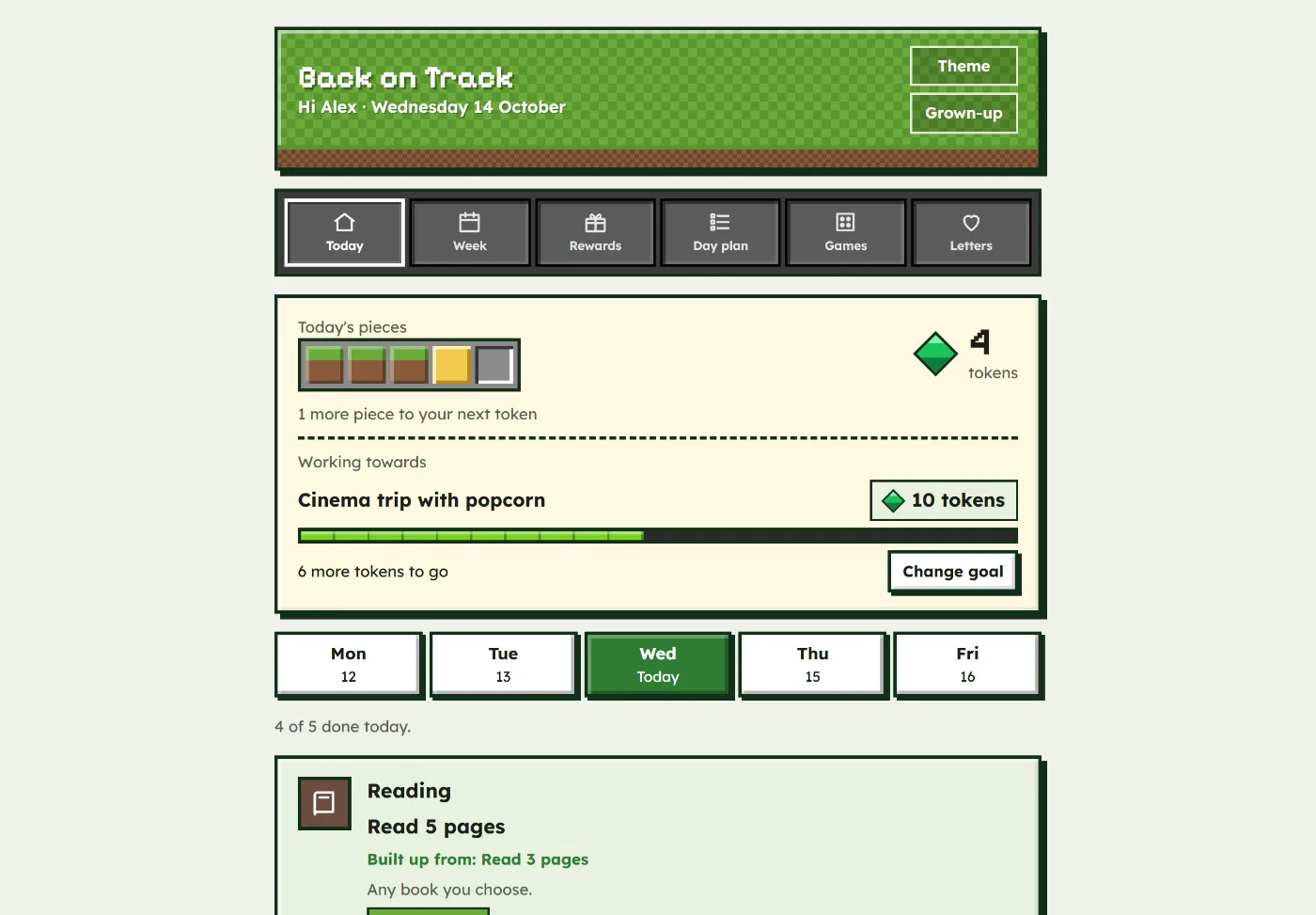
Five small pieces of learning a day. Your child ticks them off, you check them, and every five pieces make a token towards a reward they chose. Nothing is ever taken away.
£4.99 a month or £34.99 a year · up to 6 children · cancel in one tap
Works in your phone, tablet or computer browser · nothing to download · phone app coming soon
Try a theme:
- 14 days free
- One price for up to 6 children
- No streaks, no penalties
- Works on tablet, phone and laptop
Back on Track at a glance
- What it is
- A web app that gives home education a small daily rhythm: 5 manageable tasks a day, set by a parent, ticked off by the child and checked by the parent.
- Who it's for
- UK home educating families with children aged about 5 to 16, especially children with a PDA profile or demand avoidance, and autistic, ADHD and anxious children who push back against demands.
- How rewards work
- Every 5 approved pieces make 1 token, across days. Parents set the rewards and token prices. Nothing is ever taken away.
- Price
- £4.99 a month or £34.99 a year per family, for up to 6 children. 14 days free, cancel in one tap.
- Devices
- iPad, tablet, phone or computer, in any web browser. It can be added to the home screen like an app.
- Made by
- Neurodivergent Minds, Manchester, UK. Built in a home educating family with a PDA teenager.
When home education has quietly stopped happening
- Every request to start learning turns into "no", a disappearing act or a screen.
- You left school because it wasn't working, and now home learning isn't working either.
- Reward charts have backfired before, especially when something was taken away.
- You're tired of negotiating every single day, and not sure how to start again.
Back on Track doesn't ask for more. It asks for a little, most days, in a way your child can see and choose to do.
Four simple steps, every day
Easy enough that families actually keep using it.
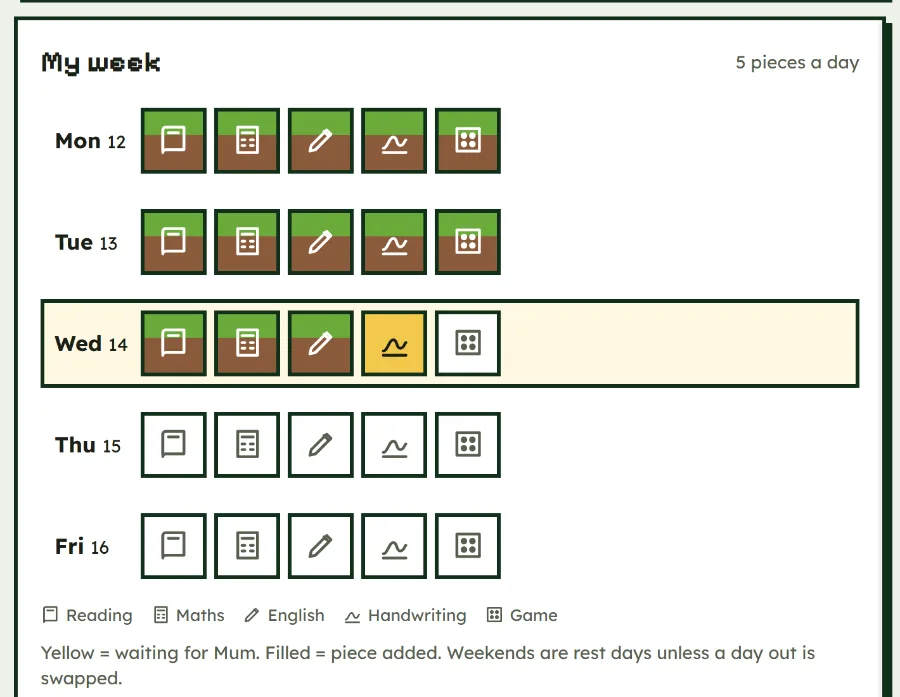
You set 5 small pieces a day
Five manageable tasks around your home ed goals, such as reading, maths, English, handwriting and a game together. Each one is a "piece", and each starts small.
You set the frame. Your child sees the whole day, so there are no surprises.
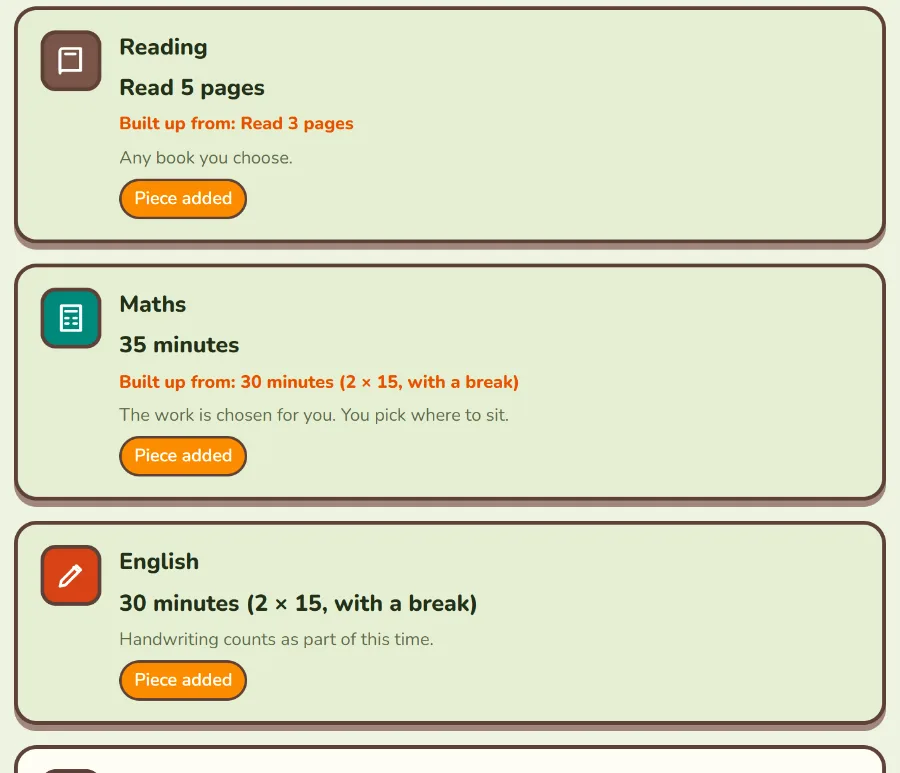
Your child ticks them off
When a piece is done, your child taps it. It lights up and waits for you, so they can see their progress straight away.
They choose the order and their own app theme. Small choices make a big difference to children who push back.
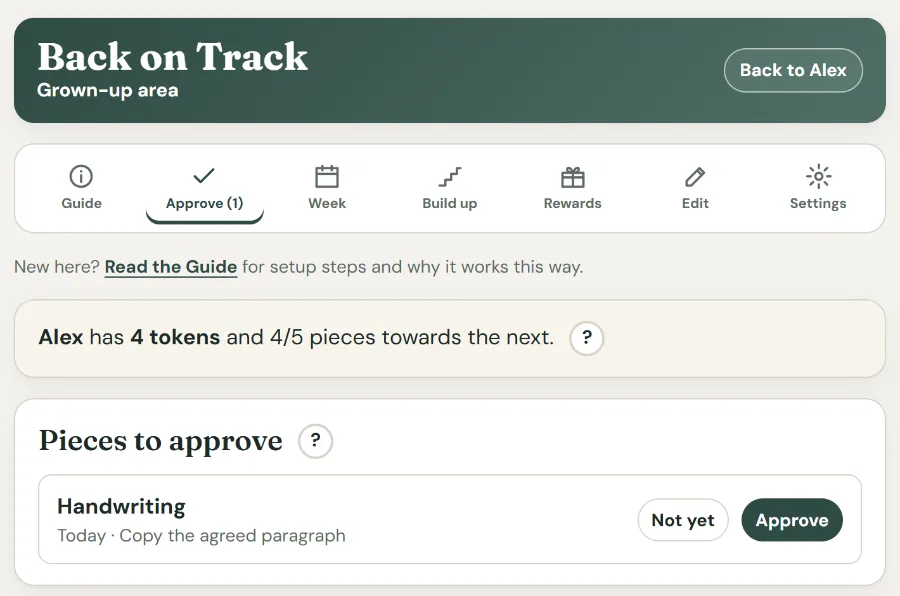
You check, whenever suits you
Your grown-up area sits behind a PIN. Approve a piece with one tap, today or days later. There's no time limit, and "not yet" never costs anything.
That moment of checking is a natural, low-pressure chance to notice the effort.
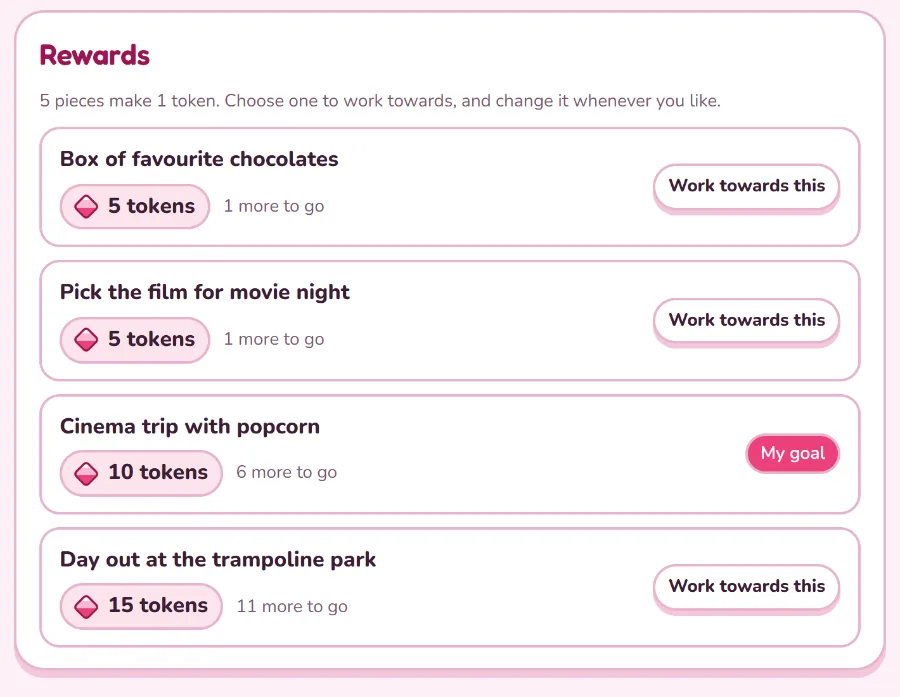
Tokens buy rewards they choose
Every five checked pieces make a token, across days. Three on Monday and two on Tuesday still count. You set the rewards and their prices.
Your child picks one to work towards and can change their mind whenever they like.
5 pieces make 1 token. That's it. A bad afternoon never cancels a good morning, and pieces earned are always kept.
Never the deep end
A full timetable overnight usually ends in overwhelm. Back on Track builds stamina one small step at a time.
- Start with what your child can manage today, even if that's three pages of reading.
- Each task has its own ladder of steps that you type in, one per line, smallest first, leading up to a future goal that has its own box.
- Step up when a step has been managed on most days, changing one thing at a time. The app gives you a gentle nudge.
- Stepping back is fine after illness or a hard week.
Five themes for ages 5 to 16
Your child picks the look and can change it any time. Every theme works in exactly the same way.
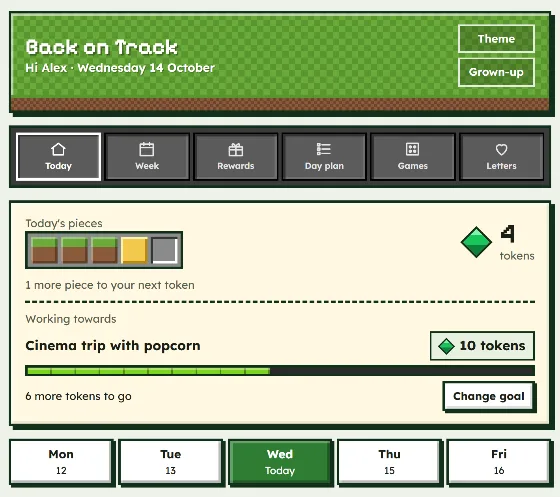
Blocks
Pixel blocks and gems
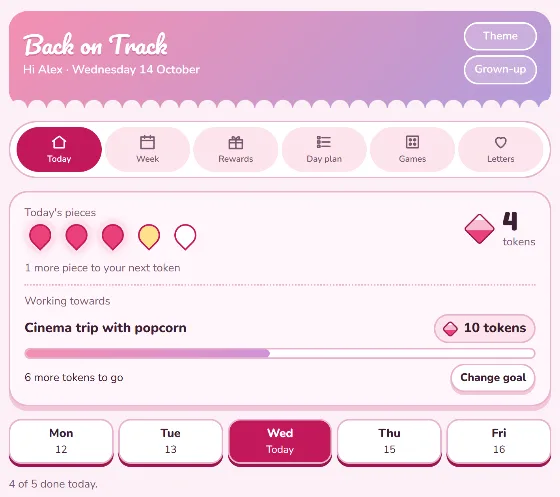
Blossom
Soft pinks and petals
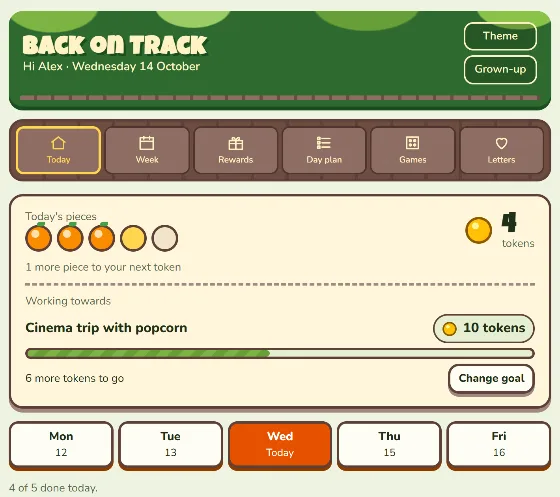
Jungle
Leafy and bright
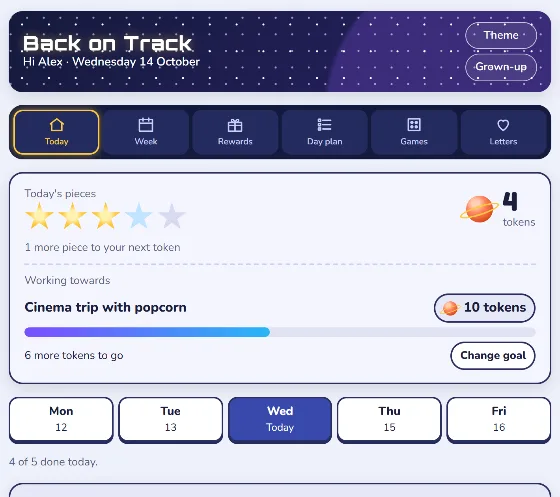
Space
Stars and planets
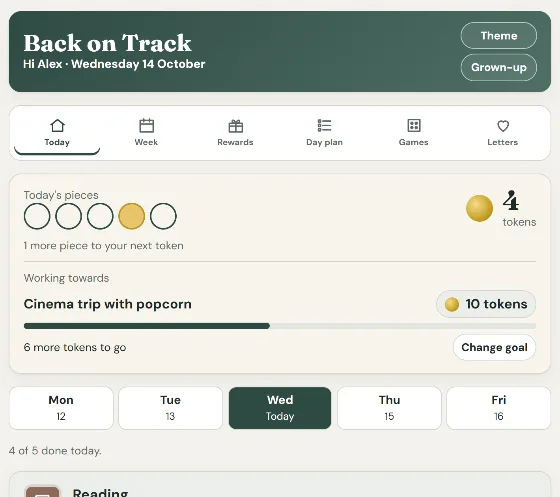
Studio
Calm and grown-up for teens
PDA-informed and demand-avoidance friendly, by design
PDA (Pathological Demand Avoidance, which many families now call a Persistent Drive for Autonomy) is a profile, often seen in autistic children, where everyday demands feel threatening and lead to high anxiety, avoidance and pushback. Ordinary approaches such as timetables, sticker charts, losing privileges and "you have to" can make things worse.
Back on Track was built in a home educating family with a PDA teenager to do the opposite: lower the feeling of demand, give real choice and control, and never take anything away. It works for any child who resists demands, including autistic, ADHD and anxious children, with or without a diagnosis.
Nothing is ever taken away
No penalties, no deductions and no lost tokens. A piece not earned is the only consequence.
You set the frame, they choose
Clear boundaries without endless negotiation, and real choice inside them.
Low-pressure language
"Here's today", not "you have to". No red crosses and no streaks to break.
Every day is a fresh start
Pieces earned are kept, whatever happened yesterday.
Visible, not nagging
The day and the reward they're working towards stay on screen, so you don't have to keep asking.
The why, built in
Little "?" pop-ups in the grown-up area explain why each part works this way.
PDA-friendly strategies the app uses for you
- Indirect, low-demand language: "here's today" and "if you like", never "you must".
- Choice inside a clear frame: your child picks the order, the reward and the look of their app.
- Small, predictable days: always five pieces, so the size of the day is never up for negotiation.
- The screen is the referee: prices and rules are written down, so nobody has to argue the deal again.
- Rewards that only add up: no losing tokens, no streaks to break and no red crosses.
- Building up slowly: start with what feels possible today, even one page, and step up only when ready.
Back on Track is a practical tool, not therapy or a diagnosis. To learn more about PDA, the PDA Society is a UK charity with information and support for families. See also our PDA support page and free guides.
All in one simple app
Put it on your home screen
No app store needed. Once it's installed, Back on Track has its own icon and opens full screen, with no browser bars to tap away into.
iPad and iPhone
- Open app.neurodivergentminds.com in Safari.
- Tap the Share button: the square with an arrow pointing up.
- Tap Add to Home Screen, then Add.
- Open it from the home screen and sign in with the 6-digit code from your email.
Android tablet or phone
- Open app.neurodivergentminds.com in Chrome.
- Tap Install Back on Track in Guide or Settings, or tap the ⋮ menu and choose Install app.
- Open it from your home screen.
Laptop or computer
- Open app.neurodivergentminds.com in Chrome or Edge.
- Click the install icon at the right of the address bar, or use Install Back on Track in Guide.
- It opens in its own window, like any other program.
Install it on each device your family uses. Ticks and tokens stay in step across all of them.
One price for the whole family
One plan covers up to 6 children, each with their own tasks, rewards and tokens. Try everything free for 14 days.
Yearly
£34.99
a year, for up to 6 children (about £2.92 a month)
Start your free trialHow the free trial works: your card is taken at the start but nothing is charged until day 15. We email you 3 days before the first payment, and you can cancel in one tap at any time. Back on Track is for parents and carers in the UK. Children never need an account.
Common questions
Is Back on Track suitable for a child with PDA?
Yes. It was built in a home educating family with a PDA teenager and is designed around PDA-friendly strategies: low-demand language, real choice inside a clear frame, small predictable days, written rules so there is nothing to argue about, and rewards that only ever add up. Every child is different, so you set the tasks and the size of each step yourself.
What is PDA (demand avoidance)?
PDA stands for Pathological Demand Avoidance, and many families now call it a Persistent Drive for Autonomy. It is a profile, often seen in autistic children, where everyday demands trigger high anxiety and a strong need to avoid them. The PDA Society is a good place to learn more.
Why do reward charts often fail for PDA children, and how is this different?
Many reward charts take things away, use streaks or turn every task into a direct demand, which can raise anxiety and lead to more pushback. In Back on Track nothing is ever taken away, every small piece counts across days, your child chooses their reward and can change it, and the screen holds the rules so you do not have to keep asking.
Is this a curriculum?
No. Back on Track doesn't decide what your child learns. It gives the learning you've already chosen a daily shape and a reason to keep going. Use it alongside any resources, websites or tutors you already have.
What ages is it for?
Roughly 5 to 16. The pieces and targets are yours to set, so they can be as small or as stretching as your child needs.
Does my child need a diagnosis?
No. It's designed with demand avoidance in mind, and it suits any child who finds demands hard, whatever their diagnosis or none.
What happens on a bad day?
Nothing is lost. Whatever pieces were done still count, and tomorrow is a fresh start. If a level is too much after illness or a hard week, step back a level. That isn't failing.
How do I get the app?
Go to app.neurodivergentminds.com in any web browser and type your email. We send you a code, so there are no passwords. Then you add your children and set up their pieces. You can add it to the home screen of a tablet or phone so it opens like an app.
Can I approve pieces later, if I forget on the day?
Yes. Pieces your child ticks wait in Approve with no time limit, so you can check them the next day or later in the week. Each one shows the day it was from, and they all still count towards tokens.
What if my child forgets to tick a piece?
Children can only tick today, which keeps things simple and avoids arguments about the past. A grown-up can use Add a missed piece in the Week section for any of the last 7 days, and it goes in as approved.
What if I forget the grown-up PIN?
Tap Forgotten your PIN? on the PIN screen. We email a 6-digit code to a grown-up in your family, and once it is entered you choose a new PIN. A child cannot reset it without that email.
Does it work on an iPad, tablet or phone?
Yes. Back on Track runs in the web browser on iPads, Android tablets, phones and computers, and you can add it to the home screen so it opens like an app. Ticks and approvals stay in step across every signed-in device.
What does it cost, and can I cancel?
£4.99 a month or £34.99 a year for the whole family, for up to 6 children. The first 14 days are free, and you can cancel in one tap. We email you 3 days before your first payment so there are no surprises.
What about the legal side of home education?
We're not legally qualified and don't give legal advice. For reliable, up-to-date information, Education Otherwise is a long-standing UK home education charity and a good place to start.
Another question? Email us
Get back on track this week
Set up in minutes. 14 days free, then £4.99 a month or £34.99 a year, for up to 6 children.
Start your 14-day free trialGo further
Home Education Planner
An energy-led weekly planner built around your child's actual capacity. Free.
View guide →How to Be a Home Educator
The parent and teacher role, feedback, burnout and day-to-day practice. Free.
View guide →All home education resources
Guides, planners and professional courses, gathered in one place.
Visit the hub →